YouTube Analytics Tools for Complete Video Performance Tracking
Video marketing moves fast. Clients need proof their YouTube strategy delivers results. Agencies need clear data without juggling multiple logins or building reports from scratch. Agency Dashboard delivers YouTube analytics tools that track subscriber growth, engagement, and video performance across every client channel in one place.
This YouTube reporting tool shows agencies exactly how channels perform. Track gained and lost subscribers, watch time patterns, traffic sources, and audience demographics. Instead of guessing what works, agencies see real data that explains where views come from, which videos connect with audiences, and how performance shifts over time.
Reports stay simple, visual, and client-ready. Agencies spend less time collecting analytics on YouTube videos and more time driving growth and refining strategy.
Get Started - it's free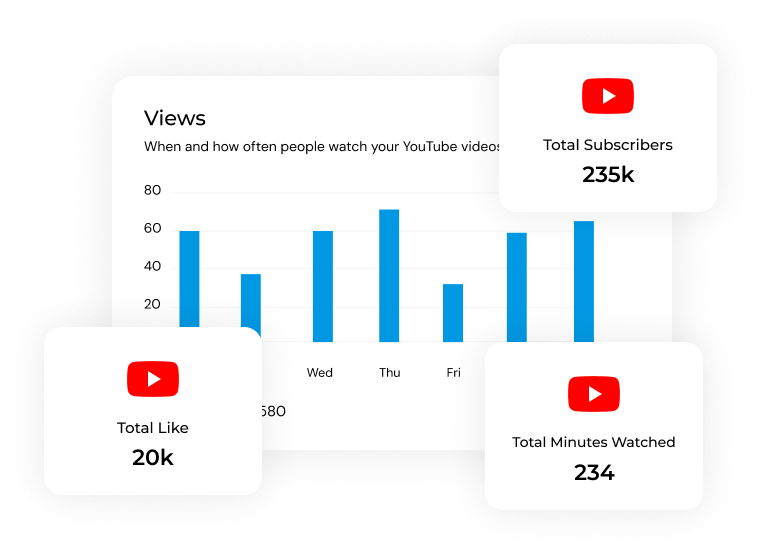

Track Real Channel Performance Over Time
Agencies see how channels truly perform across key metrics. Track subscriber trends, view counts, watch time, and engagement without assumptions. This clarity shows whether content strategies build loyal audiences or need adjustment.

Understand Where Your Views Come From
YouTube audiences discover videos through different paths. Traffic source tracking reveals whether views come from search, suggested videos, external websites, social platforms, or direct links. This insight helps agencies focus distribution efforts.

Compare Growth Trends Month-to-Month
Video performance changes over time. Three-month comparison views show whether channels are accelerating, maintaining momentum, or slowing down. Agencies spot seasonal patterns, measure campaign impact, and answer the critical question: "Are we growing faster or slowing down?"

Deliver Reports Clients Understand Instantly
Clients need clarity, not complexity. Visual dashboards turn YouTube channel analytics into clear charts and summaries. Agencies explain results during reviews without lengthy technical explanations. Clear communication builds trust and keeps clients engaged with video strategies.
Clear YouTube Performance with Visual Insights
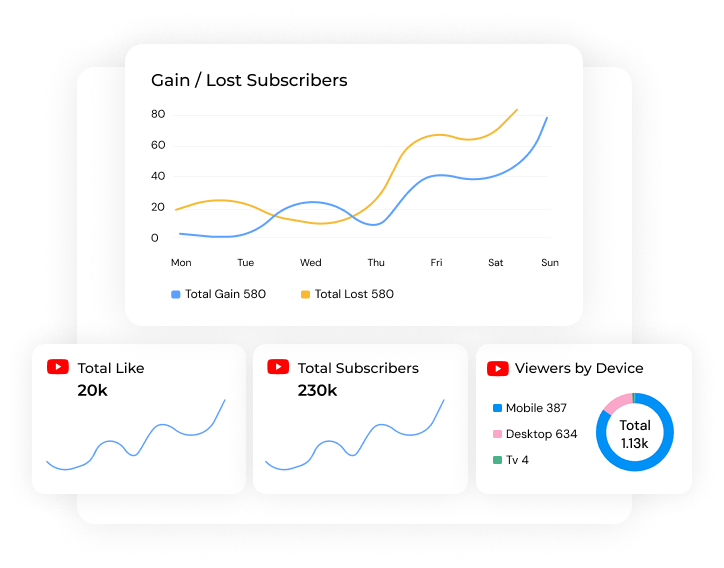
YouTube data can overwhelm. The YouTube analytics dashboard turns complexity into simple visuals that explain performance at a glance. Subscriber counts, view duration, engagement rates, and demographics appear in one unified view.
Agencies no longer explain raw numbers. The story becomes visible immediately. Charts, graphs, and trend lines make performance obvious. This clarity improves client conversations during reviews and strategy meetings.
The platform highlights where channels succeed and where they need improvement. Visual insights help agencies explain progress without confusion.
Track Subscribers Across All Client Channels
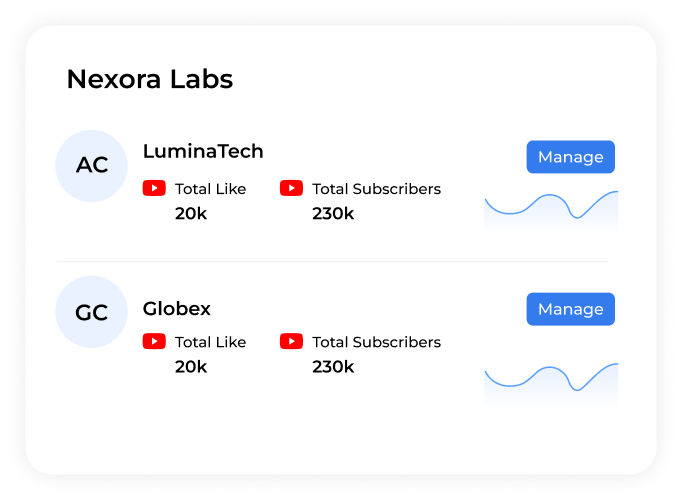
Managing multiple YouTube channels takes time. The YouTube analytics dashboard template centralizes performance tracking across every client account in one place. Connect channels, select date ranges, and compare periods without switching between YouTube Studio logins.
Agencies see gained subscribers, lost subscribers, and net growth for each channel. The dashboard shows whether content builds audience loyalty or triggers drops. High losses signal problems. Steady gains prove strong audience connection.
Agencies get consistent data across all campaigns and make smarter decisions faster.
Measure Views and Watch Behavior That Matter
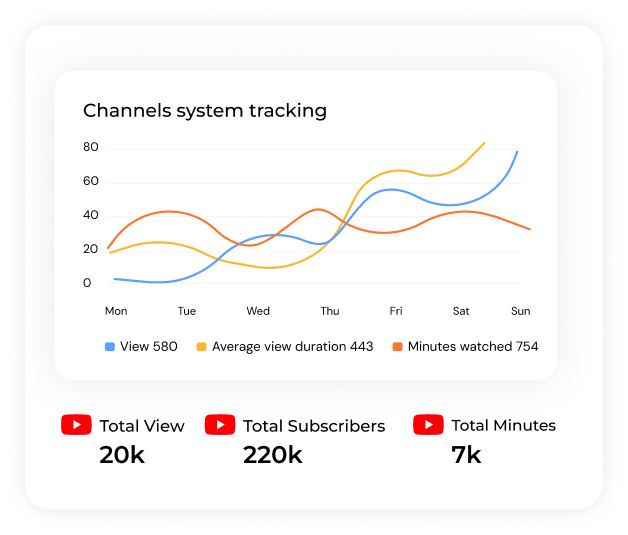
Views alone don't tell the complete story. Agencies need to understand how people watch content. The analytics for YouTube channels system tracks total views, average view duration, and estimated minutes watched across all videos.
Average view duration matters most to YouTube's algorithm. Longer watch times signal better content retention and stronger algorithmic performance. Agencies track this metric to identify which videos keep audiences engaged.
Estimated minutes watched shows cumulative watch time—critical for monetization and channel growth. This metric proves overall engagement levels and helps agencies demonstrate content value to clients.
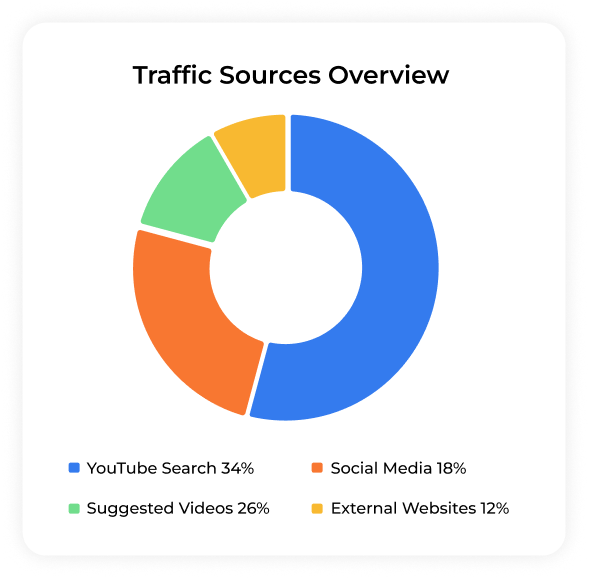
Discover Which Traffic Sources Drive Results
Traffic source tracking shows exactly where your views come from, helping agencies adjust their distribution strategy. It breaks down performance across YouTube Search, suggested videos, external websites, social media platforms, and direct links, making it easier to see which channels drive the most traffic and where to focus promotion efforts for maximum reach.
This YouTube search analytics feature answers: "Which discovery channels are working?" Agencies see whether SEO optimization, social promotion, or suggested video placement drives the most traffic.
When agencies know where audiences come from, they optimize titles, descriptions, tags, and distribution strategies accordingly.
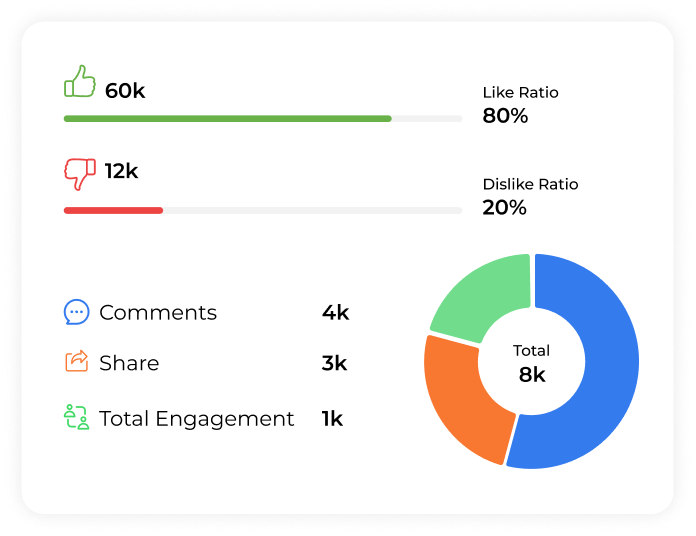
Track Engagement Beyond View Counts
Clients want proof audiences interact with content—not just watch it. The YouTube metrics dashboard tracks every engagement signal that matters. Likes and dislikes measure viewer sentiment and content approval. Like vs dislike ratio helps agencies understand audience satisfaction.
Comments indicate conversation and community activity. Active comment sections prove audiences care enough to participate. Shares show how often viewers promote content organically. High share counts indicate viral potential and content that resonates deeply.
Total engagement combines all activity into one score. This helps agencies evaluate true content performance beyond simple view counts.
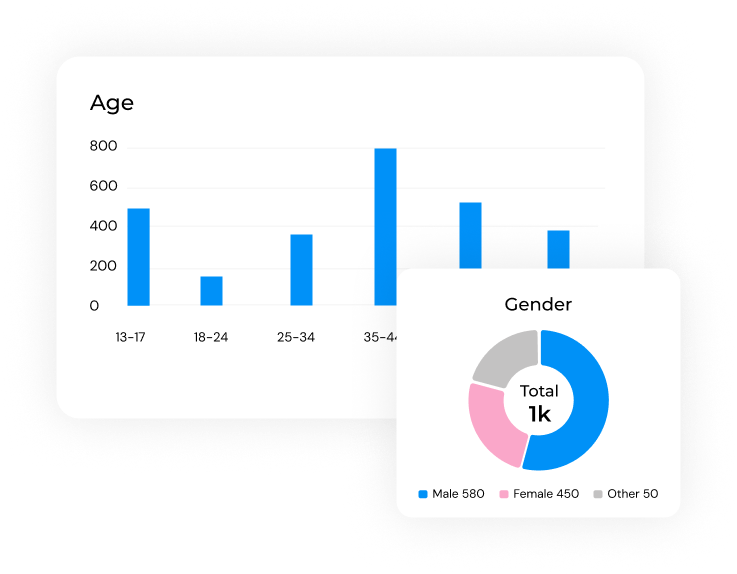
Know Exactly Who Watches Your Videos
Demographics shape content strategy. The YouTube channel reporting system breaks down audience composition by age, gender, and location. Age breakdown helps agencies target content and ads to the right demographics. Gender distribution refines brand positioning based on who actually engages.
The total demographic summary provides a complete audience identity snapshot. This section answers the critical question: "Who is watching us?"
Agencies use these insights to create content that speaks directly to core audiences and attracts ideal new viewers. Better audience understanding leads to better content decisions.
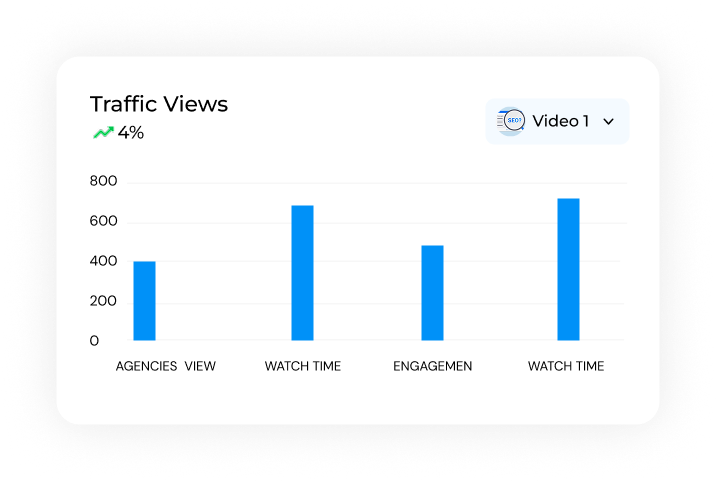
Analyze Performance for Every Single Video
The YouTube dashboard includes detailed metrics for every uploaded video, not just channel-level summaries. Agencies see views, watch time, engagement, and traffic sources for each piece of content.
Sorting videos by key metrics helps quickly highlight what's working and what isn't. It reveals top-performing videos driving growth, flags weaker content that needs improvement, uncovers trends across your content library, and surfaces opportunities to replicate successful formats or topics.
This video-level analysis answers: "What content works best?" Agencies use this data to guide content calendars, double down on successful formats, and eliminate what doesn't resonate.
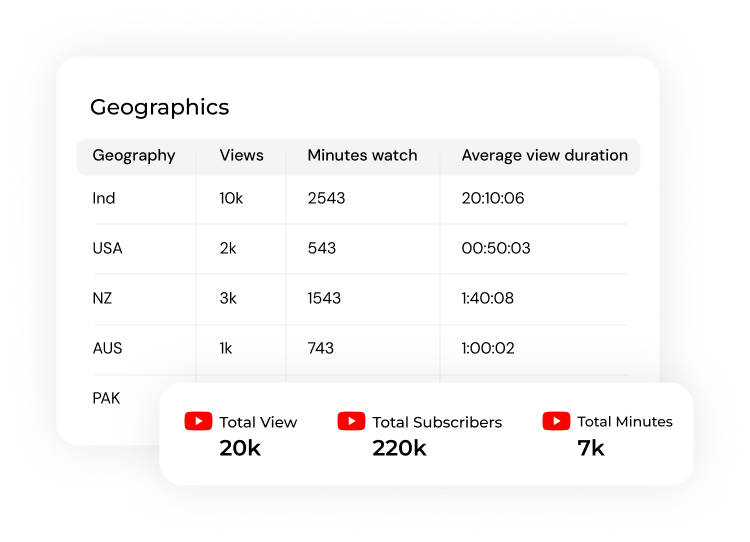
Monitor Live Performance in Real-Time
The YouTube live dashboard displays performance as it happens. Agencies track metrics for active videos and respond quickly to trending content or sudden engagement drops.
Real-time data gives agencies the ability to react instantly, helping them capitalize on viral moments, catch problems before they grow, adjust promotion strategies mid-campaign, and keep clients updated with accurate, current performance numbers.
Live monitoring turns reactive reporting into proactive strategy. Agencies stay ahead of performance shifts instead of discovering them weeks later.
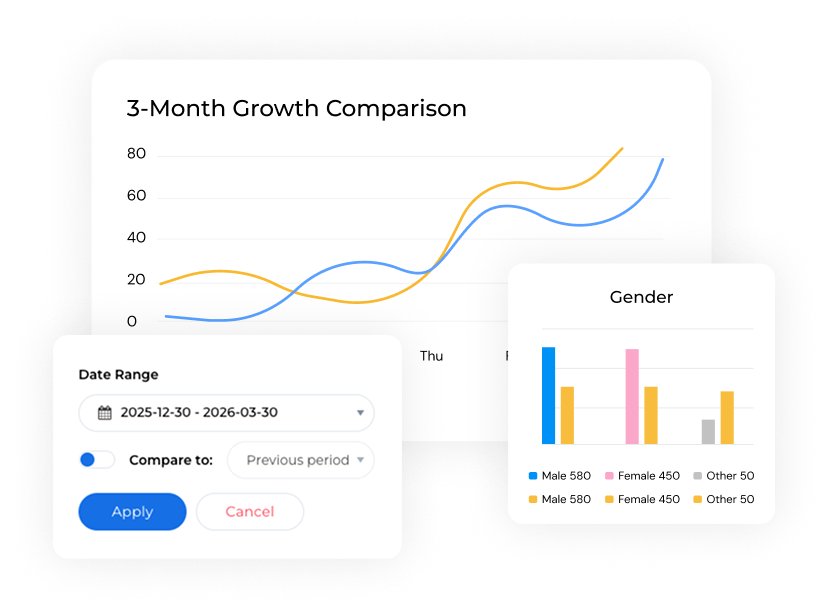
Compare Three Months of Growth Trends
Performance makes sense over time. The three-month comparison feature shows how channels perform across quarters. Agencies track whether momentum accelerates, holds steady, or declines.
Month-over-month comparisons highlight seasonal content patterns, measure the real impact of campaigns, show long-term growth trajectories, and reveal how consistent performance is over time, giving agencies a clearer strategic view of progress.
Agencies spot what drives growth and what signals trouble. This analytics YouTube feature helps prove strategy effectiveness to clients with clear historical data.
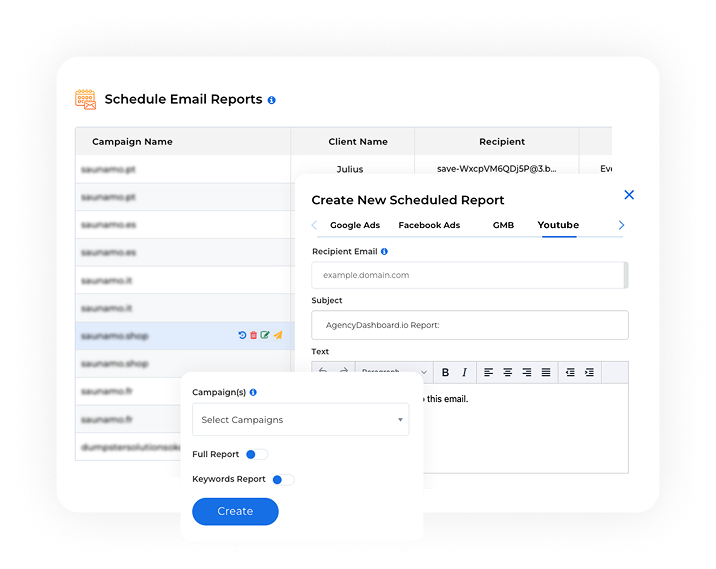
Save Hours with Automated Report Delivery
Manual reporting wastes valuable time. Scheduled YouTube analytics report delivery automates the entire process. Set up reports once, then let the system handle delivery daily, weekly, or monthly.
Agencies managing multiple clients save hours every reporting cycle. No more copying data into spreadsheets or building presentations from scratch. Reports generate automatically and arrive on schedule.
Automation ensures consistency across all client accounts. Every report follows the same format and includes the same metrics. Clients receive professional updates without agencies lifting a finger.
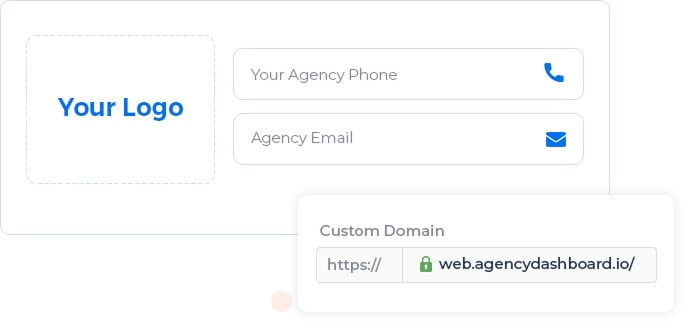
White Label Reports That Showcase Your Brand
The YouTube analytics website includes complete white-label capabilities. Add agency logos, brand colors, and custom styling to every report and dashboard. Send professional YouTube reports that look like they came from an in-house analytics platform, not third-party software.
White-label reporting helps agencies differentiate from competitors while reinforcing their brand at every client touchpoint. It builds confidence in the agency's professionalism and capabilities, creating a seamless, fully branded reporting experience that strengthens long-term client relationships.
Perfect for client presentations and retention. Professional presentation matters, and white labeling delivers it effortlessly.

Unified Analytics Across All Marketing Channels
Clients use more than YouTube to grow their businesses. The best YouTube analytics tools combine video metrics with data from other marketing channels—social media, SEO, PPC, and web analytics.
Detailed dashboards give agencies a full performance view by placing video analytics alongside social media engagement, search rankings, ad campaign results, website traffic, and conversion data. Seeing everything in one place helps connect content performance to real business outcomes and supports smarter strategic decisions.
This unified approach proves how video marketing contributes to overall business growth.
YouTube Analytics Tools Trusted by 1000+ Digital Marketers
Start Your Free Trial Today!We Offer What Your Agency Needs

Clear Performance Data without Guesswork
Track subscribers, views, watch time, and engagement across all client channels. See exactly what works and where improvement is needed.

Beautiful Reports Clients Admire
Visual dashboards transform YouTube keyword analytics into clear stories. Clients understand performance without technical explanations or confusion.

One Platform for Multi-Channel Management
Monitor every client channel from one dashboard YouTube interface. No more switching between YouTube Studio accounts or juggling multiple tools.

Insights That Support Strategic Decisions
Data connects video performance to growth opportunities. Agencies guide smarter content strategies with confidence based on real metrics.

Built for Multi-Client Agency Workflows
Manage dozens of channels with consistent, accurate reporting. The platform scales smoothly as agencies grow their client rosters.

Live Data from YouTube Analytics
Up-to-date metrics ensure agencies always share reliable insights clients trust. Real-time tracking means no delays in performance visibility.
More Integrations for Agency Dashboard







Sign Up for Free
Start your effortless marketing journey with Agency
Dashboard with a 14-day free trial today!
Frequently Asked Questions (FAQs)
Agency Dashboard tracks subscribers, views, watch time, engagement, demographics, traffic sources, and device usage. The platform includes video-level performance data, three-month comparisons, and automated reporting for all client channels.
Automated report scheduling eliminates manual data collection. Agencies set up reports once and receive scheduled deliveries—daily, weekly, or monthly. White-label customization removes the need to rebuild branded presentations.
Yes. Connect unlimited client channels and monitor performance from one unified dashboard. Switch between accounts instantly without separate YouTube Studio logins.
The platform combines subscriber tracking, engagement metrics, traffic sources, demographics, and video-level performance in one place. White-label reporting, automated delivery, and multi-channel integration make client management effortless.
Yes. Track audience age, gender, location, and device usage for every channel. Demographic insights help agencies create targeted content and optimize video strategy.
Video-level performance data shows which content drives growth and which underperforms. Traffic source tracking reveals how audiences discover videos. Agencies use these insights to replicate success and eliminate what doesn't work.